
One of the most powerful features we’ve added into the new Game Launcher Creator is a feature called Compare a Variable. This is actually classed as an ‘action’ in the Event Action system, however, whilst the name might sound basic, it is actually probably one of the most powerful features inside the new GLC.
It is so powerful, we actually have to write a whole blog post on it here just to explain what it is, what it can do and what power it brings to your custom game launcher developments with GLC.
What is Compare A Variable
In the new Game Launcher Creator editor and runtime, we now have a powerful variable system.
This allows you to set, add, edit and remove data from variable slots and manipulate and use this data at your own pleasure.
If you do not know what a variable is, think of it like this. You define a list of ‘variables’ using variable names inside the editor, just like this…
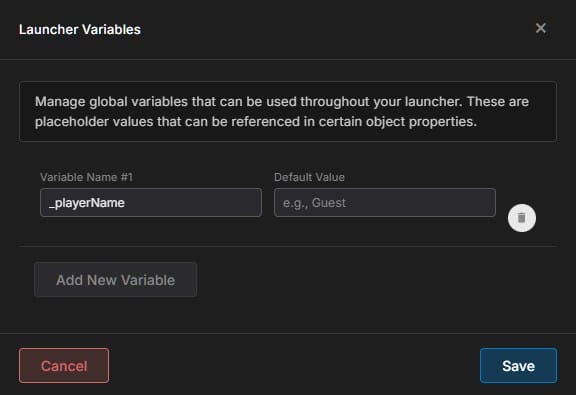
You can give it a default value, either a number or a text string. This is what the value will remain as from the start, until modified.
So if, for example, we create a variable we want to store the player name as, we create the variable called “_playerName” and we leave the Default Value as blank (empty).
Then say at some point in your launcher, you either ask the player for their name (using an edit box), you can then store that name in the value for _playerName, so the player’s name gets stored.
Now, say you have a button that launches your game and you need to pass the player’s name as a command line argument, well you can now as you already have it stored under the variable “_playerName” right?
Right. However, what if the user didn’t specify their name? How do you check this?
With Compare a Variable.
How to Use Compare A Variable
Let’s say you have a “Launch” button in your game launcher to start the game but you need to send the player’s name as a command line argument. This is easy to do because with the powerful event action system, you can simply place variables anywhere you like.
For example, in your “Launch Local File” action, you would specify the commandline variable like this:
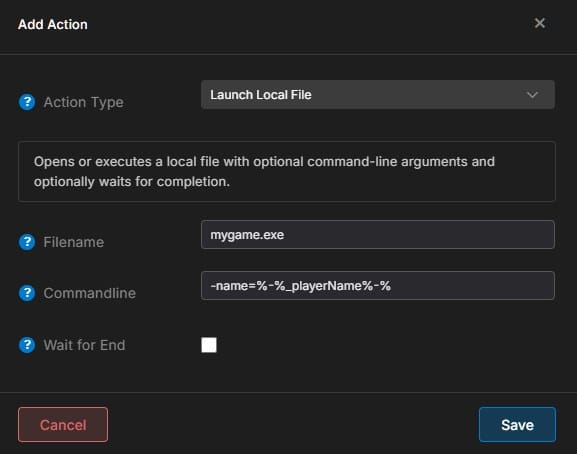
You can literally use variables anywhere inside your custom game launcher by simply specifying it as the name inside of %-% like this:
%-%_playerName%-%
So now when this game is launched (mygame.exe), it sends the command line parameter (-name) along with the actual name stored in the variable.
BUT, how do we check they did it or if it’s invalid? Well we return to our action list for this event and we insert a new action “Compare a Variable” and we move it before the “Launch Local File” action.
So you would add a new action, select “Compare a Variable” and this is what you will see…
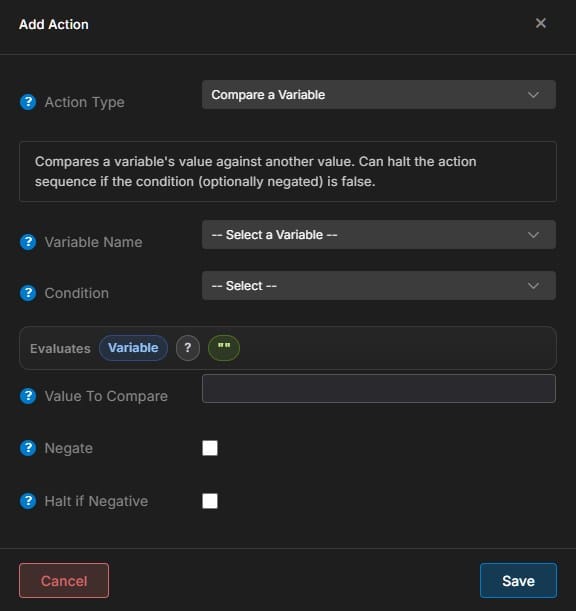
So inside here, we can select our variable _playerName and then decide how and what we want to compare it against.
Compare a Variable - The Workhorse of Logic
Compare a Variable checks a variable against something else and optionally halts the action chain if the check fails. It’s the simplest way to write “if/then” logic in your launcher.
Fields
Variable Name – The value to test (you can enter the placeholder or select from the list).
Condition – The comparison to make (see table below).
Evaluates – Whether to evaluate the Variable field as an expression first. Leave it on Variable for normal use; switch to
""(literal) if you want to treat the input as raw text.Value To Compare – The right-hand side (can also use placeholders and expressions).
Negate – Flip the final result (turns “contains” into “does not contain”).
Halt if Negative – If the (possibly negated) result is false, stop the remaining actions in this event.
| Condition | What it checks | Text matching | Numbers |
|---|---|---|---|
| equals | True when the value and the thing you compare to are the same. | Not case-sensitive (Admin equals admin). |
If both look like numbers, compares as numbers ("10" equals "010"). |
| not equals | True when they are different. | Not case-sensitive. | Same numeric rule as “equals”. |
| contains | True when the value includes the text you typed. | Not case-sensitive (e.g. email@example.com contains @EXAMPLE.COM). |
Works on text only. |
| greater than | True when the value is a bigger number than what you typed. | — | Numbers only. If either side isn’t a number, result is false. |
| less than | True when the value is a smaller number than what you typed. | — | Numbers only. If either side isn’t a number, result is false. |
| is empty | True when the value is empty after trimming spaces. | "" and " " count as empty. |
— |
| is not empty | True when the value has any non-space characters. | Opposite of “is empty”. | — |
%-%coins%-% and helpers like NUM(...) in the compare fields.
“Negate” flips the result (useful for “does not contain”). “Halt if Negative” stops the rest of the actions when the check fails.
So carrying on our example, here is what our Compare a Variable action looks like to check that the player name is NOT EMPTY and HALT IF NEGATIVE.
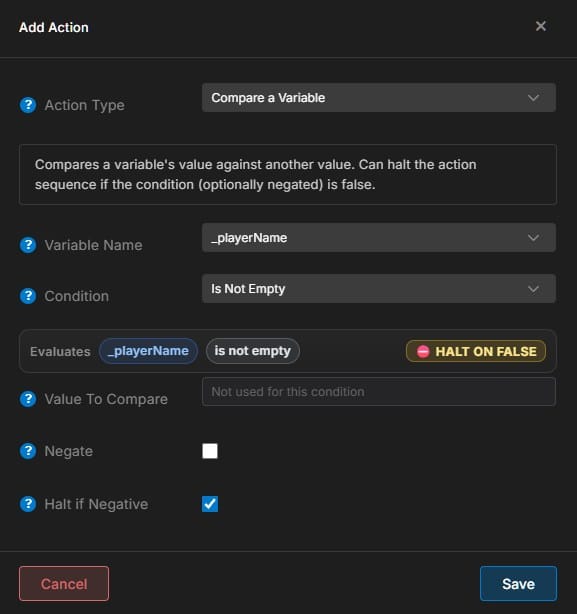
So what this evaluation tells GLC is, if the variable _playerName is empty, halt processing any further actions in this chain. So the game will not be launched in this instance.
Collect the player name into
_playerName(edit box, login flow, or set variable action).Add a Compare a Variable before your launch action:
Variable Name:
%-%_playerName%-%Condition:
is not emptyHalt if Negative: ☑ (checked)
Add your Launch Local File action:
Command line:
-name=%-%_playerName%-%
Result: If _playerName is blank, the action chain stops. Add a toast or message action just above it to tell the user what’s missing.
The beauty
The End Result
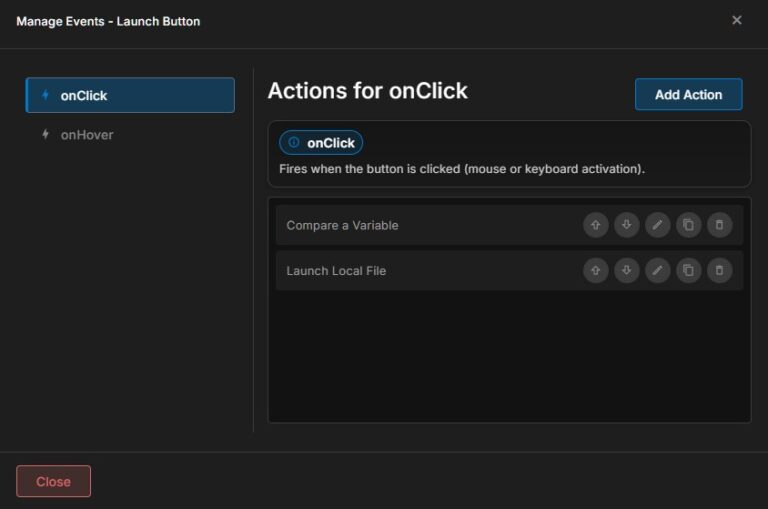
So as you can see now, the compare a variable check is done before the launch local file and if it’s empty, it won’t run the launch local file action.
The best thing about this being an action is, you can stack multiple checks on top of each other. So as well as checking it’s not empty, you can also perform other checks like:
- Is the length of the username above a certain count?
You would create another variable first called “_playerNameLength and then use the action “Set variable” with:
LEN(%-%_playerName%-%)
Then in the compare a variable action, check if the _playerNameLength variable is greater than 2.
IS THE LENGTH OF THE USERNAME A MINIMUM OF 3 CHARACTERS LONG?
Unlimited Possibilities
There are around 12 new actions available to Developers to add, edit and remove variables at runtime including load and saving from/to files, letting the user specify data for a variable, you can change variables yourself manually or let something else change it dynamically.
The world is literally your oyster with GLCV4.